
Plan Your Solution
Dev, Test, and Production Environments
Test
Real Deployment with Docker and Live Integrations
What It Is
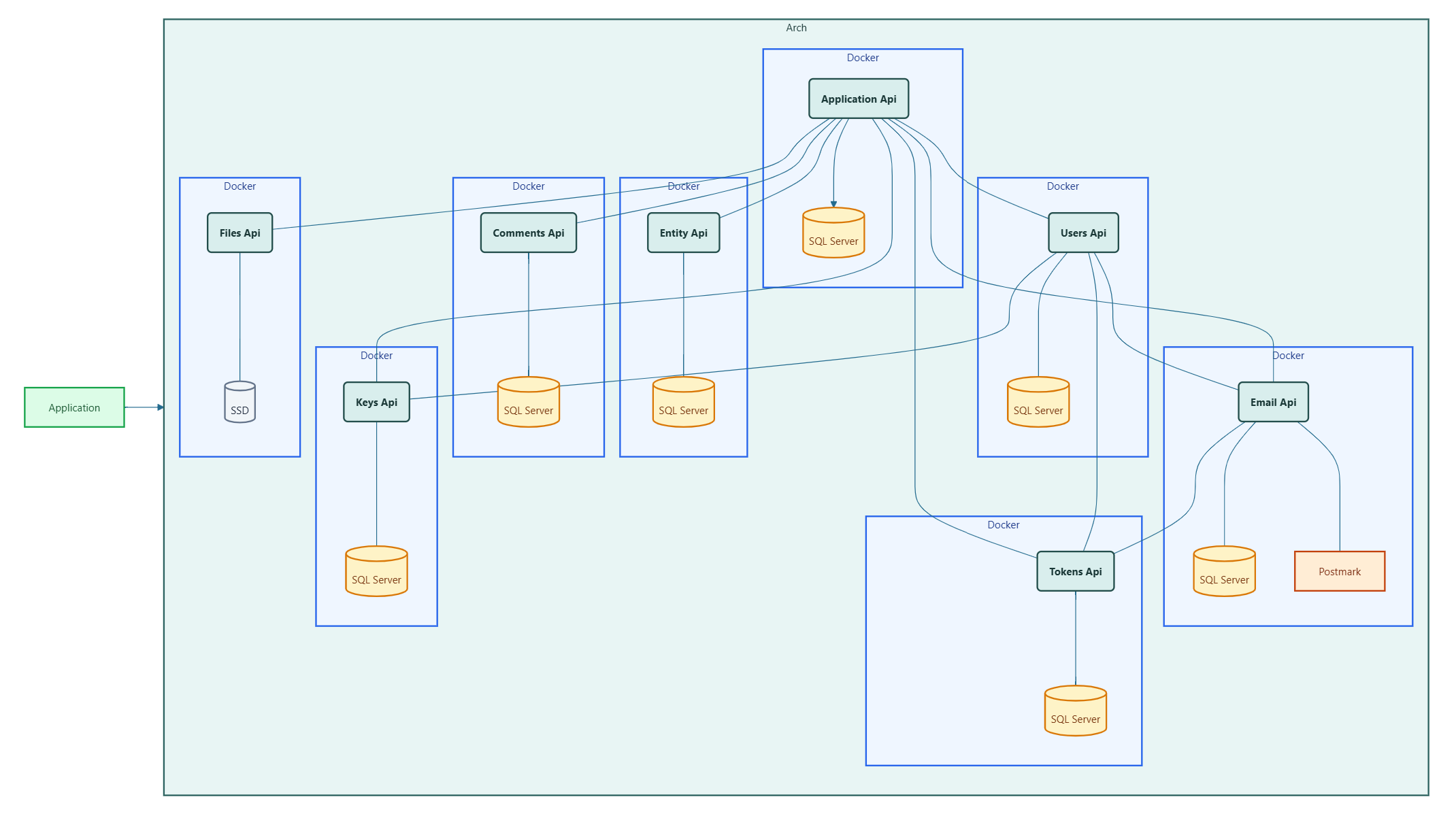
The test environment is a genuine deployment. Arch microservices run as Docker containers from yml service definitions. Sql Server runs in its own container with a persistent volume. Third-party integrations — such as Postmark for email — use live credentials pointed at test accounts. The full authorization chain operates exactly as it does in production. This is where integration problems surface, and where confidence in your deployment is built.
System Diagram
Sql Server runs in its own container with a persistent data volume. The Control Panel connects to Sql Server and manages all microservice configurations. Each Arch microservice is a container deployed from its yml service definition, connecting to Sql Server and to the Application Api for authorization. Your application server connects to the Application Api and to whichever Apis it uses. All containers communicate over a shared Docker network.
Infrastructure
Plan the host before the containers. The test environment needs a machine running Docker and Docker Compose with enough resources to host Sql Server and every Arch microservice you plan to deploy. Decide early whether Sql Server runs as a Docker container on the same host or as a separate managed instance — both work, and the choice affects your connection strings throughout. The Control Panel must be reachable from every microservice container, so plan your Docker network and hostnames accordingly.
Which Apis to Deploy
Plan which Arch Apis your application requires before setting up the environment. Each Api has dependencies — deploy them in this order to satisfy those dependencies:
  1. Application Api — no dependencies; the foundation everything else connects through.
  2. Keys Api — depends on Application Api.
  3. Tokens Api — depends on Application Api.
  4. Email Api — depends on Application Api and Tokens Api.
  5. Users Api — depends on Application Api, Keys Api, Tokens Api, and Email Api.
  6. Entity Api, Comments Api, Files Api — each depends on Application Api.
  7. Your application microservices — deployed last, after all Arch Apis they depend on are running.
Only deploy the Apis your application actually uses. You can add more later by repeating the same setup process for each new one.
Third-Party Accounts
Plan your third-party accounts before setting up the environment. Any Api that integrates with an external service requires credentials that you will need before you can complete its configuration in the Control Panel.
If you are deploying the Email Api, you will need a Postmark server token and webhook credentials. Use a dedicated test message stream — this keeps test emails separate from your production sender reputation metrics and prevents accidental delivery to real users.
Diagnostics
Plan to use diagnostics during initial setup and disable them before the environment is considered stable. With diagnostics enabled, the Control Panel can verify that each microservice's running configuration matches what was generated — an important check when setting up for the first time.
Once all microservices pass their health checks and authorization is verified, set Microservice__EnableDiagnostics to false in each service yml file and restart the containers. A test environment with diagnostics still enabled is not ready to be promoted to production.
Tech Sovereignty
Arch
Company
About Contact