
Plan Your Solution
Dev, Test, and Production Environments
Production
The Same System, with Production Configuration
What It Is
The production environment is structurally the same as test. The same Docker containers, the same yml service definitions, the same Control Panel workflow. What changes is the configuration: production credentials, HTTPS certificates, diagnostics off, and production-grade third-party accounts. A system that passes in test deploys to production without architectural changes.
System Diagram
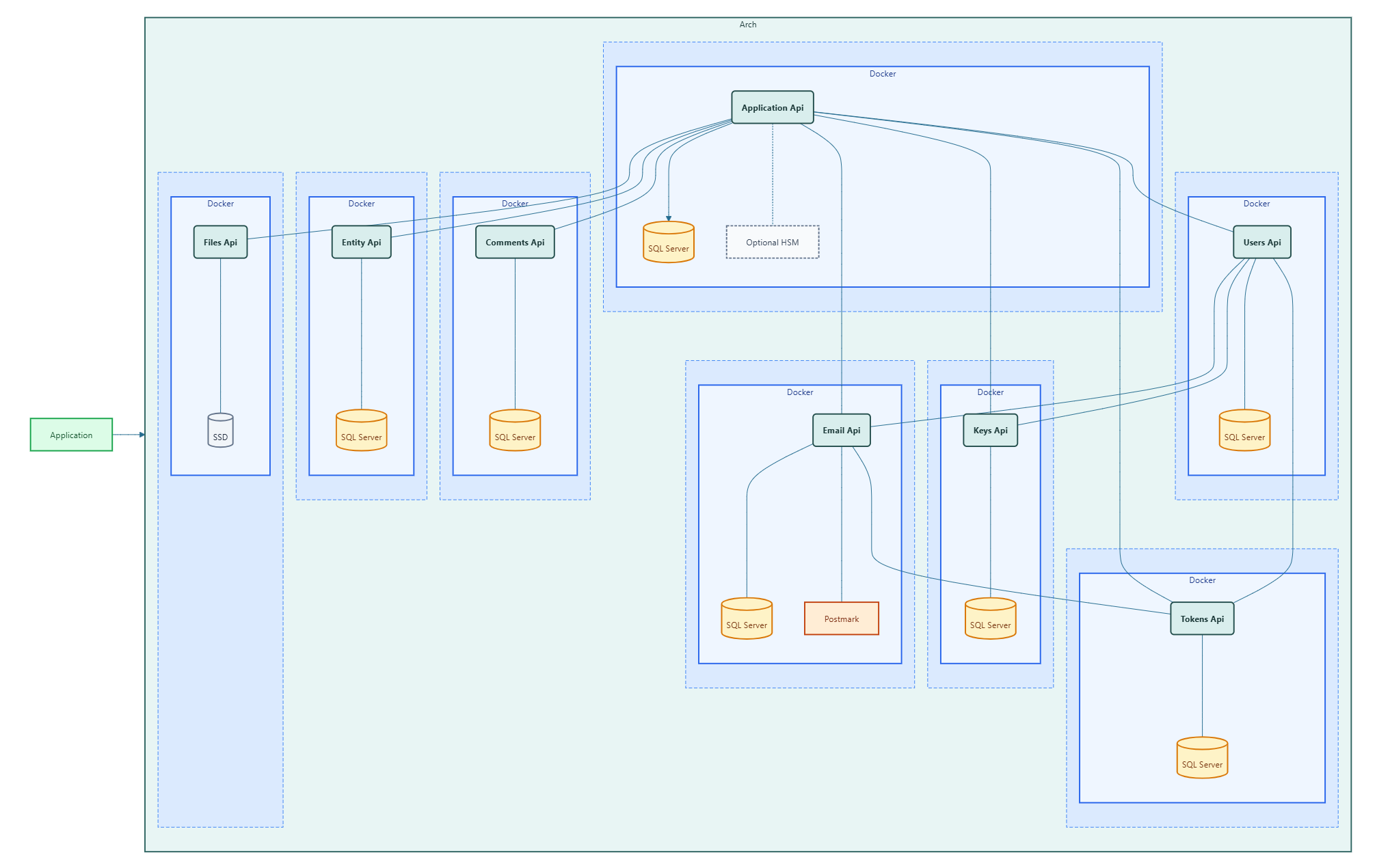
The topology is identical to the test environment. Sql Server, the Control Panel, and all microservices run in Docker containers on a Docker network. Your application connects to the Arch microservices it depends on. HTTPS is configured at the service layer using certificate-enabled yml definitions. All diagnostic endpoints are disabled.
What Changes
Plan these decisions before standing up the production environment. Each one has lead time — credentials to obtain, certificates to provision, paths to coordinate with your infrastructure team.
  • Encrypted values are environment-specific. All encrypted environment variables for production must be generated by a Control Panel instance connected to your production Sql Server. Values from test cannot be reused — they are cryptographically bound to the instance that produced them.
  • TLS. Decide whether you terminate HTTPS at each microservice container or at a reverse proxy in front of them. Both approaches are supported; the choice affects your yml variant selection and certificate provisioning plan.
  • Third-party credentials. Replace test-stream Postmark credentials with production server token and webhook settings. Plan your production message streams before the deployment.
  • Sql Server. Point connection strings to your production database server. Ensure empty databases are created for each microservice before first run.
  • Diagnostics off. Set Microservice__EnableDiagnostics to false in every service yml file — it must not be enabled in production.
Certificate Strategy
Plan your TLS strategy before provisioning the environment. Two approaches are available:
Service-level certificates. Each Arch microservice ships with a -cert.yml service definition variant. Use these when microservices are exposed directly, or when you want end-to-end encryption within your Docker network. The certificate must be accessible to the container via a bind mount.
Reverse proxy termination. Terminate TLS at a reverse proxy (eg. nginx, Traefik) and run standard yml variants behind it. This is the simpler approach when all microservices sit behind a single ingress.
Hardware Security Module
Decide whether your production deployment requires a Hardware Security Module before provisioning the environment. The HSM feature on the Application Api stores cryptographic keys inside a YubiHSM 2 v2.4 physically attached to the server running the Application Api container. This is the highest level of key protection Arch offers.
Plan for the operational implication: the Application Api will not start until it is unlocked via the Guardian. Unlock must be performed every time the Application Api restarts. If this is acceptable for your uptime requirements, configure YubiHSM settings and the Guardian access token in the Control Panel before enabling the feature.
Operations
Plan your operations model before go-live. The Control Panel's Health Check is your primary signal that the system is running correctly — decide how frequently you will run checks and who owns the response when a microservice is unhealthy. If you are using the HSM feature, build an unlock procedure into your restart runbook. Know in advance which team is responsible for each layer: database, Docker host, Arch microservices, and your application.
Tech Sovereignty
Arch
Company
About Contact