ARCHitecture
Architectural Layout
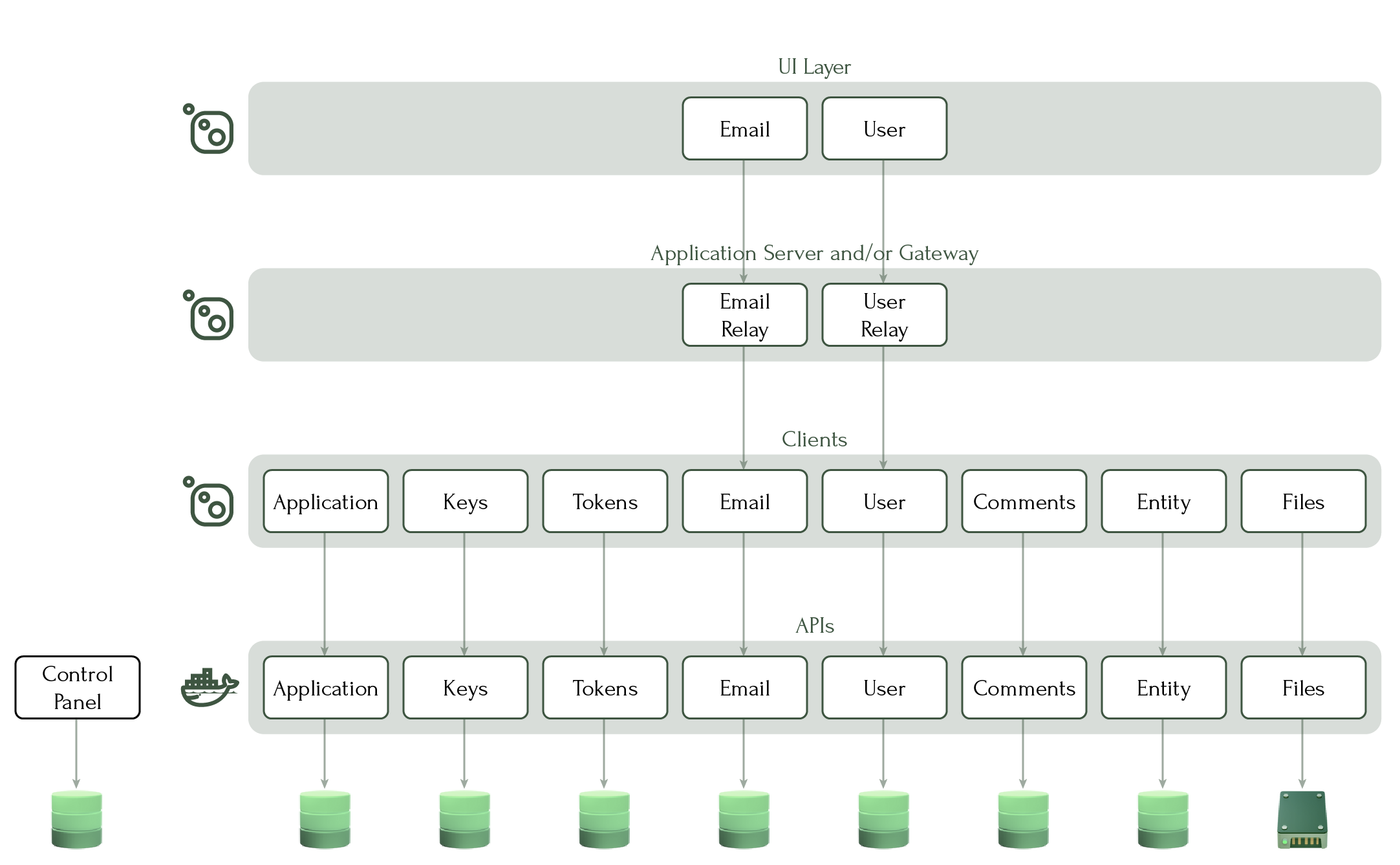
Arch is a layered distributed system. A set of specialized microservices forms the foundation, each owning a distinct domain and enforcing its own boundaries. Your application server sits above them, calling into services through encrypted clients and composing the capabilities your product requires. A user interface layer sits above your application, and the Control Panel runs alongside the whole system as its management plane — configuring, registering, and diagnosing every service in the network from a single console.
APIs
Each API is its own vertical slice — a self-contained microservice with its own codebase and its own database. The architecture enforces these boundaries by design, so each service deploys and scales independently of every other.

APIs are available as Docker images from the Triunnia Labs container registry, or as downloadable .zip packages for IIS installation. Each API that requires persistent storage manages its own database — as a best practice, on its own server. The Files Api stores its data on a disk or network drive rather than a database.
Clients
Each API is accessed exclusively through a corresponding client — a package you embed in your application server or gateway. Clients handle the encrypted communication protocol automatically, so the request your application sends is already protected before it leaves the process. They are available as NuGet packages today, with additional language bindings planned as demand requires.
Application Server
Your application server is the component you build. It sits between the Arch platform and the user — calling into APIs through their clients, assembling the results, and applying the business logic that defines your product. Relays are available for each API, allowing commands from the UI layer to pass through your server directly to the appropriate service without re-implementing the interface.

A gateway fits this same position in the architecture and is useful where a DMZ separates your internal services from the edge. A gateway composed of relays can serve that boundary without exposing platform internals to the outside.
UI Layer
The user interface layer is the face your product presents to the world — web, mobile, desktop, or extended reality. It communicates with your application server through relay packages that mirror the API client interfaces, giving it access to platform capabilities without reaching directly into the platform itself.

Blazor UI components are available today for the Email and Users APIs, with additional components planned as the platform matures.
Control Panel
The Control Panel is the management plane for the entire system. It runs on your internal network — outside the service mesh — and reaches into the platform to configure, register, and diagnose every service it knows about. Every microservice in the network, whether from the Arch catalog or from your own codebase, is registered and managed here. Like each service, it maintains its own database.
Tech Sovereignty
Arch
Company
About Contact